
Key Takeaways
What you'll learn in this article
- Show what softened butter does under gentle pressure instead of relying on the phrase room temperature.
- Tie the demonstration to a recipe that calls for creaming butter and sugar; melted butter is correct for other methods.
- Keep lighting, camera position, and sample identity consistent so the edit does not manufacture a texture change.
- Plan the next video around the viewer’s unresolved baking decision, then review comprehension separately from reach.
Key Takeaways
- Show what softened butter does under gentle pressure instead of relying on the phrase room temperature.
- Tie the demonstration to a recipe that calls for creaming butter and sugar; melted butter is correct for other methods.
- Keep lighting, camera position, and sample identity consistent so the edit does not manufacture a texture change.
- Plan the next video around the viewer’s unresolved baking decision, then review comprehension separately from reach.
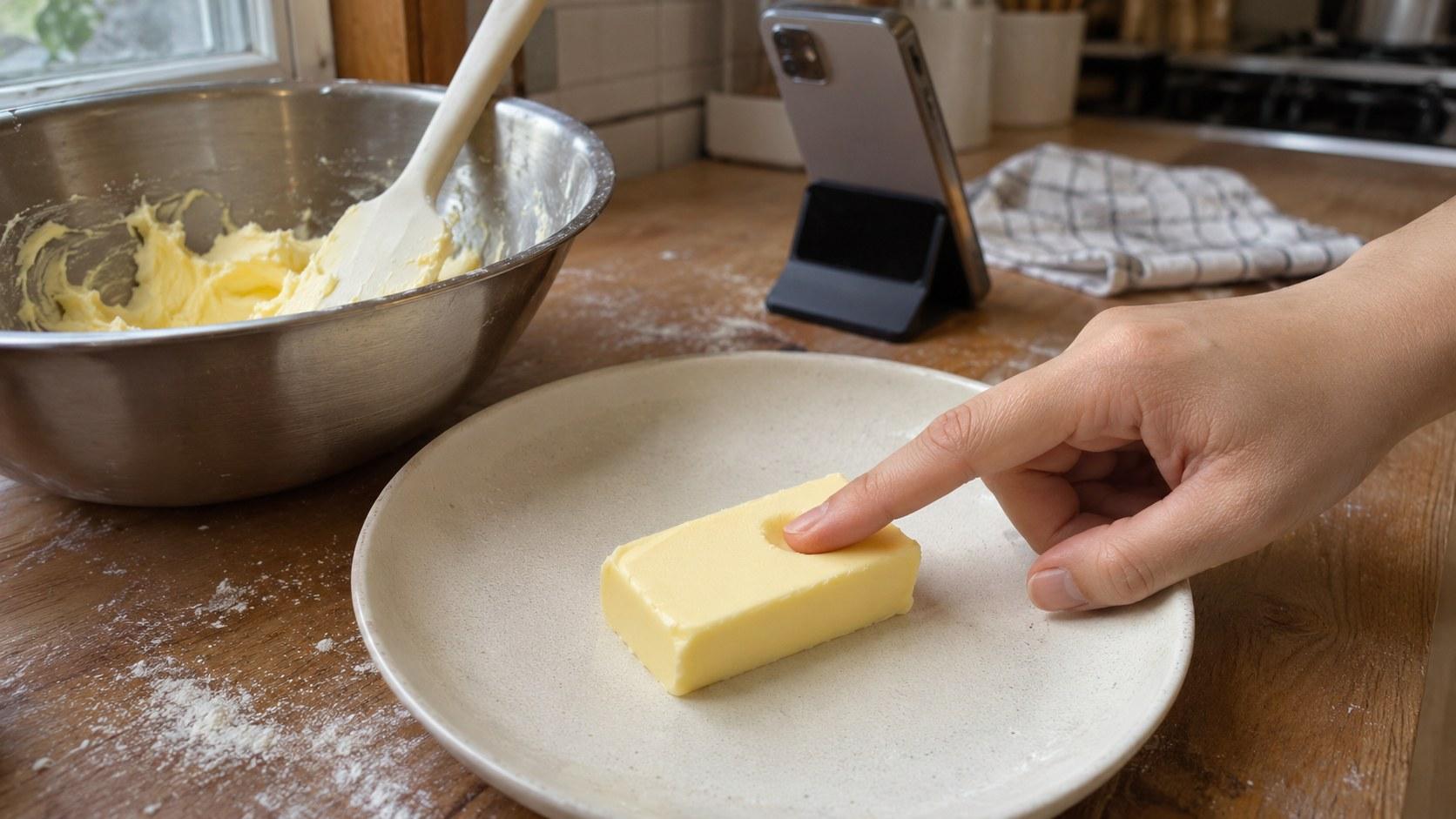
Better baking TikToks show softened butter before it disappears into the mixer: frame a close-up, press gently to reveal an indentation with some resistance, and explain that the butter should not look greasy or collapse. Then show the creamed mixture your recipe needs. That small sequence turns an ambiguous ingredient instruction into a decision a beginner can actually make.
A finished cake cannot explain what your butter felt like ten minutes earlier. If viewers keep asking whether they should melt it, leaving the bowl spinning on screen for longer will not necessarily help. The missing content is the readiness check before mixing, not another dramatic dessert reveal.
Choose a method before choosing a hook
Start with one recipe you have already made successfully. Confirm that it explicitly calls for softened butter and a creaming step. Do not apply the demonstration to every cake, cookie, or pastry you make.
In its guide to creaming butter and sugar, King Arthur Baking explains that sugar helps aerate the butter. Its guidance describes properly softened butter as slightly cool, able to take an indentation, and still offering some resistance. Butter that is too warm and soft does not support the intended aeration in the same way.
That is a specific technique, not a rule that melted butter ruins baking. Some recipes deliberately call for melted butter. Your video should make its boundary explicit: this check is for the softened-butter creaming method used in the recipe you are demonstrating.
Write the teaching promise before filming: “Show beginners how I decide whether this butter is ready to cream.” Keep microwave hacks, ingredient swaps, chilling experiments, and cookie-spread comparisons for separate posts. Trying to answer all of them at once makes a useful close-up compete with several different lessons.
Film the readiness check in one continuous shot
Place the butter on a plain plate where its surface and edges are visible. Use clean hands and make a gentle indentation with one finger. Keep the beginning, contact, and release in the same shot so viewers can see what happened rather than only a dent you made off camera.
Explain both sides of the cue. You want the surface to yield, but not for your finger to plunge through a greasy mass. Do not force a dramatic dent into cold butter to make it look ready. The point is the response to gentle pressure, not the appearance of a deep fingerprint.
King Arthur’s softening-method trials also warn that the exterior and interior can soften unevenly with some methods. If you are demonstrating a shortcut, a soft-looking outside alone does not establish that the entire piece is ready. Show the actual sample you will use, and disclose unevenness if you find it.
A camera cannot transmit temperature or resistance. Say what you feel while showing the visible cue. “It yields but still resists” is more informative than silently pointing at a yellow rectangle. If you use a thermometer, show the actual reading and its units; do not add an invented temperature later in editing.
Keep the setup from changing the evidence
Butter keeps changing while you film. Prepare your angle, focus, and narration before bringing the demonstration portion into position. Several rehearsals beside a warm appliance can leave you filming a different consistency from the one you intended to teach.
For baking TikToks, consistency in the image matters as much as a beautiful countertop. Try this simple setup:
- Put the plate in soft side light so the indentation has a visible edge.
- Fix the phone position and focus on the butter, not the background mixer.
- Keep exposure steady if your camera allows it; avoid a blown-out yellow surface.
- Record the gentle press and release without a cut.
- Move that same portion into the mixing bowl, or clearly identify a separate demonstration sample.
If you show several states, identify each one in the narration and edit. Do not silently swap a too-soft portion for a firmer one between the press and the bowl shot. A viewer should understand which sample produced the mixture you later show.
You also do not need three full batches merely to illustrate a tactile cue. One honest readiness demonstration can be enough. Label a separate illustrative sample as such rather than implying it is part of a controlled baking experiment.
Show the creaming endpoint, not just the spinning mixer
A mixing montage establishes that you used a machine. It does not establish that the viewer knows when to stop.
Record the starting mixture, an intermediate check, and the endpoint required by your recipe. Stop the mixer before bringing utensils near its moving parts. Keep your lighting and bowl angle similar so a color change is not just a camera adjustment.
King Arthur’s creaming guide describes the desired mixture as pale and fluffy, while also distinguishing under-creaming from over-creaming. Avoid teaching “keep going until it is as white as possible.” More mixing is not automatically better.
If you compress time in the edit, say so. Record your actual elapsed mixing time and equipment, but present them as conditions of your demonstration rather than a universal timer. A different mixer, quantity, or starting temperature may not reach the same state on your schedule. The visible endpoint is the lesson; the clock adds context.
A spatula close-up can make the mixture easier to read than an overhead shot of beaters moving at speed. Hold it still briefly. Give beginners time to see the texture you are describing before cutting to eggs, flour, or the finished bake.
Build a short post around one decision
Here is a hypothetical filming brief for a creator whose audience asks what softened butter means. It is a planning example, not a report of audience results.
- Opening: show the gentle press and say that softened does not mean melted for this recipe.
- Scope: identify the recipe and its butter-and-sugar creaming method.
- Evidence: show the indentation, describe the resistance, and note the absence of a greasy collapse.
- Transition: move the checked butter into the bowl.
- Payoff: show the stopped mixer and the finished creamed texture.
- Closing: ask which stage viewers find harder to judge: the butter or the mixture.
Cut decorative preparation before cutting the explanatory close-up. If the audience cannot see the indentation on a phone-sized preview, tighten the crop or reshoot. Enlarging a blurry image in editing will not recover the missing detail.
Write the caption to preserve the method boundary. Include the recipe reference and clarify that the clip is a technique demonstration if it does not contain the full recipe. A viewer arriving through a shared clip should not mistake a partial lesson for complete baking instructions.
Package the lesson without turning it into a universal fix
Use a hook that promises the decision you actually show. “What softened butter looks like before creaming” is defensible. “This fixes every flat cookie” is not: the video has not tested every recipe or isolated every possible cause.
The hook generator can help explore wording, but check every suggestion against the footage. Reject lines that promise a bake-off, a rescue, or a finished-result comparison you never recorded.
Once the lesson is clear, InsightTok AI can help turn it into a next-post plan through Next Post Studio: useful hook options, a niche-relevant rising sound, and an account-informed posting time. Treat those as packaging choices, not substitutes for demonstrating the technique accurately.
If you choose music, keep the spoken explanation understandable. A quiet track or original narration may serve this lesson better than a sound whose beat forces you to cut away before the press is visible. You can explore InsightTok AI without making the teaching sequence depend on a trend.
Review understanding separately from views
After posting, read the questions before deciding what to film next. “Can I use melted butter in this recipe?” suggests the method boundary needs reinforcement. “What should the mixture look like?” suggests a closer endpoint demonstration. Neither question automatically means you need a completely different niche.
TikTok’s current TikTok Studio documentation describes account and video analytics, including viewer information and engagement insights. Use the fields available in your interface, and compare with similar technique posts over the same observation period. Features can vary; do not assume every account exposes identical information.
Keep two separate notes: whether the explanation answered the intended question, and whether the post attracted useful audience interest. A low view count cannot prove the butter demonstration was wrong. A large view count cannot validate a baking claim.
For your next baking TikToks, change the unresolved teaching step first. You now have a specific filming task, a defensible promise, and a way to evaluate it without pretending one post reveals an algorithm rule. When you want help organizing the hook, sound, and posting window around that lesson, plan your next post.
InsightTok AI Team
Expert in TikTok growth strategies and social media analytics. Helping creators reach millions with data-driven insights and AI-powered recommendations.
Ready to Grow Your TikTok?
Get AI-powered analytics and content recommendations to boost your views and engagement.
Start Free TrialRelated Posts
Photography TikToks: Show Motion Blur Without Blaming Focus
Plan photography TikToks that explain motion blur with matched photo crops, honest exposure settings, and a clear next-post teaching sequence.

The Search Asset vs. Algorithm Video Framework 2026: How to Create for Viewers and Brand Discovery
Learn when to create algorithm videos, durable search assets, or hybrid TikTok content. Use this practical 2026 framework to grow your audience and attract better-fit brand partnerships.

The Creator Defensibility Framework 2026: Build Assets AI and Competitors Can’t Copy
Learn how to turn creator insights, intellectual property, audience trust, and owned distribution into durable competitive advantages. Use this practical framework to build a business that AI and competitors cannot easily copy.