
Key Takeaways
What you'll learn in this article
- Make real steam visible with side-backlight and a darker background before changing your phone settings.
- Rehearse the framing with a cool, empty bowl so the hot food arrives only when you are ready to record.
- Capture a short, stable opening, then show the useful recipe step or explanation your audience came for.
- Judge the shot by visibility and relevance, not by whether it resembles a dramatic studio advertisement.
Key Takeaways
- Make real steam visible with side-backlight and a darker background before changing your phone settings.
- Rehearse the framing with a cool, empty bowl so the hot food arrives only when you are ready to record.
- Capture a short, stable opening, then show the useful recipe step or explanation your audience came for.
- Judge the shot by visibility and relevance, not by whether it resembles a dramatic studio advertisement.
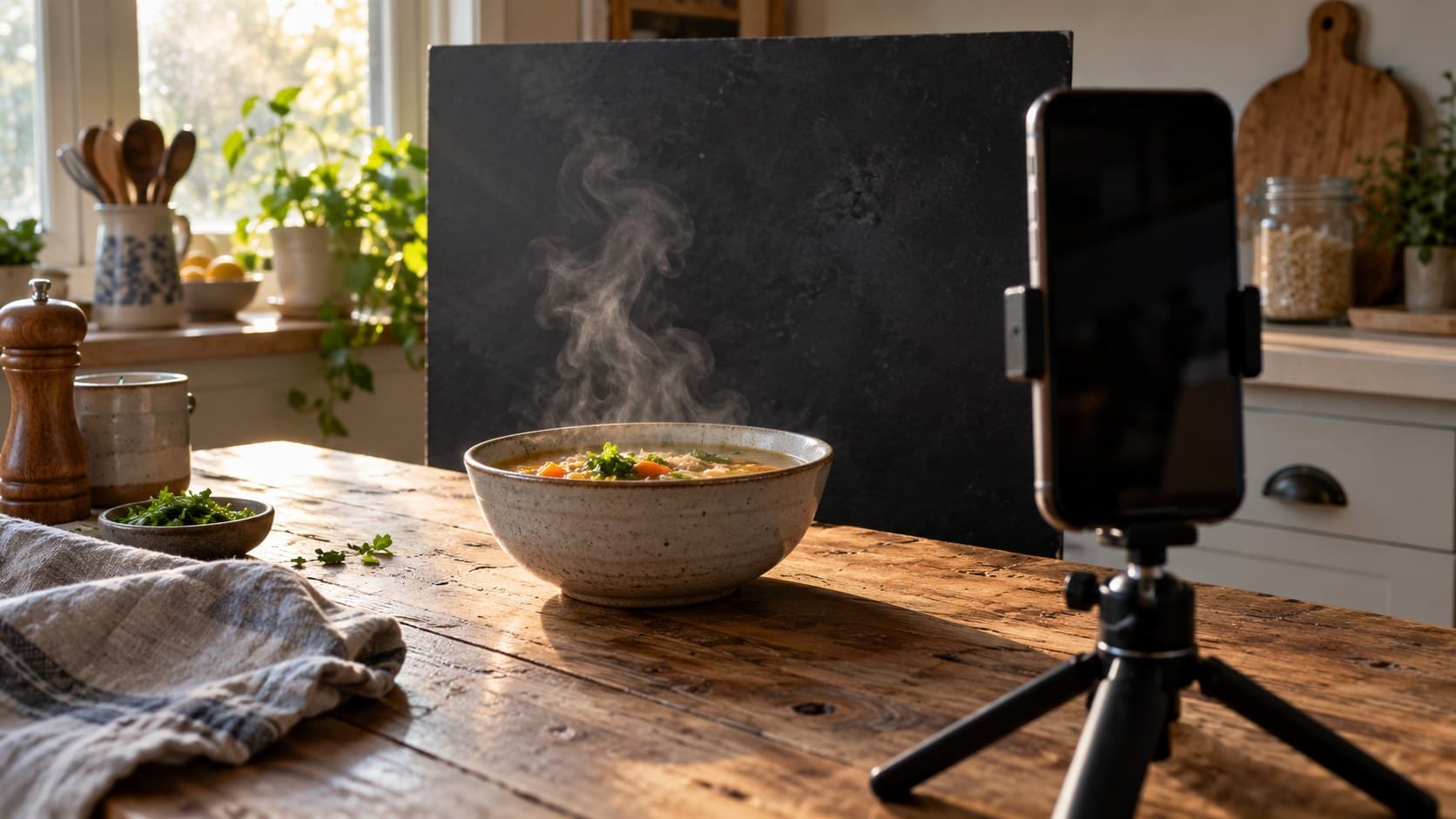
To film steam for TikTok, place your hot dish in front of a relatively dark background, let window light pass through the rising steam from behind and to one side, and record with a stable phone at a low enough angle to see the space above the food. Set up before serving. If the steam disappears on screen, change the light and background relationship before adding filters or reheating the dish.
This is a practical filming method for food and drink creators, not an algorithm trick. A visible curl of steam can establish a warm soup, freshly poured drink, or just-finished meal. It still needs to lead into a useful promise: what the recipe is, which technique you are showing, or why the viewer should keep watching.
Diagnose why the steam disappears
Look at the phone preview rather than judging the setup with your eyes alone. Check three things:
- Is there visible steam rising from the actual food?
- Does light pass through it toward the camera from a rear-side angle?
- Is the area directly behind it dark enough to provide separation?
A white wall or bright window directly behind the bowl can make pale wisps difficult to distinguish. A lamp beside the phone may brighten the food without doing much for the steam. Neither problem automatically calls for a new camera.
Food photographer Darina Kopcok's guide to photographing steam recommends side-backlighting, a darker background, and a tripod. Those lighting and staging principles are useful here. The recording sequence below adapts them to phone video; it does not copy still-photography shutter settings into a moving clip.
Also separate visibility from quantity. A dish can be appropriately hot without producing a large, persistent plume in your room. Do not keep increasing its temperature just to force the image. If the steam is too subtle, a spoon lift or clear texture shot may be the better opening.
Build the frame before bringing in hot food
Start with an empty, cool bowl or mug. Put the phone on a stable support away from the counter edge, and choose a vertical frame for the post itself. Leave visible space above the rim. An overhead view might explain an assembly step well, but it often gives steam less separation from the dish beneath it.
Use a low three-quarter view as a starting point. You should see enough of the food to understand what it is, plus enough background for the steam to move through. Avoid framing so tightly that the interesting movement leaves the picture immediately.
Then rehearse the action without heat:
- Place the bowl on a repeatable spot.
- Check that your hand can leave the frame without hitting the phone.
- Decide whether the opening is a stationary dish, a spoon lift, or a pour.
- Remove packaging, distracting reflections, and private information from the background.
- Make sure a cable cannot drag the tripod toward the food.
This rehearsal matters more than perfect styling. Once you serve the dish, you should be recording, not searching for a missing tripod clamp.
Put light behind the steam, not behind the phone
Imagine looking down at the tabletop. The phone is in front of the bowl. Place the window or continuous light toward the bowl's rear-left or rear-right, outside the picture. Adjust the angle until the rising wisps become distinct in the preview.
A matte dark wall or freestanding background can help, but it should not block the light you need. Move the background separately from the bowl. Keep paper, cloth, and other flammable materials away from burners, hot appliances, and heating elements. A tabletop away from the stove is a simpler filming location.
If the dish becomes too dark while the steam looks good, try a pale card off to the front-side to reflect some window light back toward the food. Use it lightly: flooding the background with extra illumination can undo the separation you just created.
If the whole image looks hazy, check whether the light is shining directly into the lens. Shift the phone or source slightly. Do not solve a placement problem by stacking contrast filters until the soup looks unlike the meal you made.
The useful rule when you film steam for TikTok is to change one position at a time. Move the light or filming angle, review a short clip, then adjust the background if necessary. Moving everything together makes a successful setup harder to repeat.
Keep the phone settings simple
Clean the lens first. Begin with your phone's ordinary video mode and main camera, using enough distance to keep the food in focus. Avoid starting with heavy digital zoom or a simulated background-blur mode that might handle wispy edges unpredictably.
Tap to focus on the food or rim. If your camera offers focus and exposure locking, use it after checking the composition. The exact controls vary by phone and app. Review the result to ensure the camera is not repeatedly shifting focus between the steam, dish, and background.
Adjust exposure only as needed to retain detail in the bright rim and food. There is no universal brightness setting for this shot: a dark background, reflective mug, and pale soup will each influence the preview differently.
Record a brief test and play it back at normal speed. A still preview cannot tell you whether the movement looks natural. Start with ordinary-speed footage before experimenting with slow motion, which can introduce another lighting and playback variable.
You can record in your device's camera app and upload the clip afterward. TikTok's current editing guidance documents uploading device footage, trimming clips, rearranging them, and adjusting speed. Use the controls available in your version; a specific menu layout is not the purpose of the shot.
Record genuine steam without making the setup unsafe
When the frame is ready, serve the food as you normally would and start recording promptly. Use heat-safe dishes and a protected surface. Keep your face, hands, and phone out of the rising hot vapor, and do not reach across the dish to operate the camera.
Do not add smoke, dry ice, household chemicals, or concealed heated materials to make a meal look hotter. This workflow uses the dish's own steam. It is easier to explain honestly and avoids introducing unnecessary hazards around food.
Notice drafts before you serve. A nearby fan can push the wisps out of frame, but never disable ventilation required for cooking or appliance safety. Move the filming station instead. Give your hands a moment to leave the scene so their movement does not become the entire shot.
Capture a few usable seconds rather than waiting indefinitely for a perfect curl. If the steam fades, move on to the cooking explanation or a texture detail. The post should not depend on repeatedly overheating a meal.
Turn the attractive opening into a useful post
Here is a hypothetical soup-video plan, not a customer result:
- Opening: a steady view of the finished bowl with naturally visible steam.
- Promise: explain the one technique that gives this particular soup its texture.
- Demonstration: show the relevant cooking step clearly, with the actual ingredients and conditions.
- Payoff: show the resulting consistency with a spoon.
- Close: give the next practical instruction rather than a generic demand to follow.
The steam establishes the scene; the demonstration delivers the value. Do not use it as proof of a cooking time, food safety, or an ingredient claim. Those require their own evidence.
If you need help wording the promise, use the hook generator to explore openings, then remove anything the footage cannot support. A specific explanation is stronger than claiming this is the best soup anyone will ever make.
InsightTok AI can help turn the idea into an account-informed next-post plan through Next Post Studio, combining useful hooks, niche-relevant rising sounds, and a personalized posting-time recommendation. Choose a sound that leaves the explanation understandable, and check that you have the appropriate rights for your use. An attractive shot does not require trend audio to justify its place in the edit.
Check the finished video and choose the next test
Before posting, watch the exported clip at ordinary phone size. Ask whether the steam is actually visible, whether the dish remains recognizable, and whether text covers the part of the image you worked to capture. Then watch with sound off: can a viewer identify the meal and the promise without guessing?
After posting, separate craft from audience response. TikTok's Studio documentation describes account and video analytics, viewer activity times, and engagement insights. Use the fields available to you, alongside the substance of comments. Questions about the recipe are different feedback from compliments about the lighting.
For your next attempt, keep the recipe topic and explanatory format reasonably similar while changing the opening shot. This is a practical comparison, not proof that steam caused any difference in reach. Do not draw a broad conclusion from a single pair of posts.
Keep a quick setup note: window direction, phone position, background, and the action you recorded. Learning to film steam for TikTok is useful when the method is repeatable and serves the story, not when each bowl requires an elaborate production.
For help connecting your next food-video idea to a hook, sound, and account-informed posting window, try InsightTok AI.
InsightTok AI Team
Expert in TikTok growth strategies and social media analytics. Helping creators reach millions with data-driven insights and AI-powered recommendations.
Ready to Grow Your TikTok?
Get AI-powered analytics and content recommendations to boost your views and engagement.
Start Free TrialRelated Posts
Why Your TikTok Creator Payments Arrive 30-90 Days Late While Competitors Get Paid Upfront: The Creator Cash Flow Crisis Framework
This post explores the causes of late TikTok creator payments and presents a framework to manage the creator cash flow crisis. It covers negotiation strategies, escrow, and invoice factoring lines.
Why Your TikTok One Contract Earned You $0 Commission While Brands Made $15K Using Your Content: The Creator Agreement Negotiation Framework to Protect Usage Rights, Prevent Perpetual Licensing Transfers, Negotiate Fair Rates, Claim Back Catalog Earnings, and Escape Unfavorable Payment Terms in 2026
This comprehensive guide explores how to negotiate TikTok One contracts, protect content usage rights, and ensure fair payment terms for creators.
Why Your TikTok Content Earns $5K From Views But Brands Make $50K Using Your Video as Spark Ads: The Creator Licensing & Rights Framework to Negotiate Usage Terms, Prevent Perpetual Rights Transfers, Reclaim Lost Spark Ad Revenue, and Protect Your Likeness From Unauthorized Brand Amplification in 2026
Understand how TikTok's licensing agreements affect your earnings and learn strategies to negotiate terms, prevent perpetual rights transfers, and protect your likeness.