
Key Takeaways
What you'll learn in this article
- Film the product, packing decisions, and finished parcel before customer labels or paperwork enter the shot.
- Give each video one useful promise, such as showing what is included or how a gift option differs.
- Keep real fulfillment separate from demonstration packs, and label a demonstration honestly.
- Choose commercially appropriate audio and use viewer questions to plan the next packing post.
Key Takeaways
- Film the product, packing decisions, and finished parcel before customer labels or paperwork enter the shot.
- Give each video one useful promise, such as showing what is included or how a gift option differs.
- Keep real fulfillment separate from demonstration packs, and label a demonstration honestly.
- Choose commercially appropriate audio and use viewer questions to plan the next packing post.
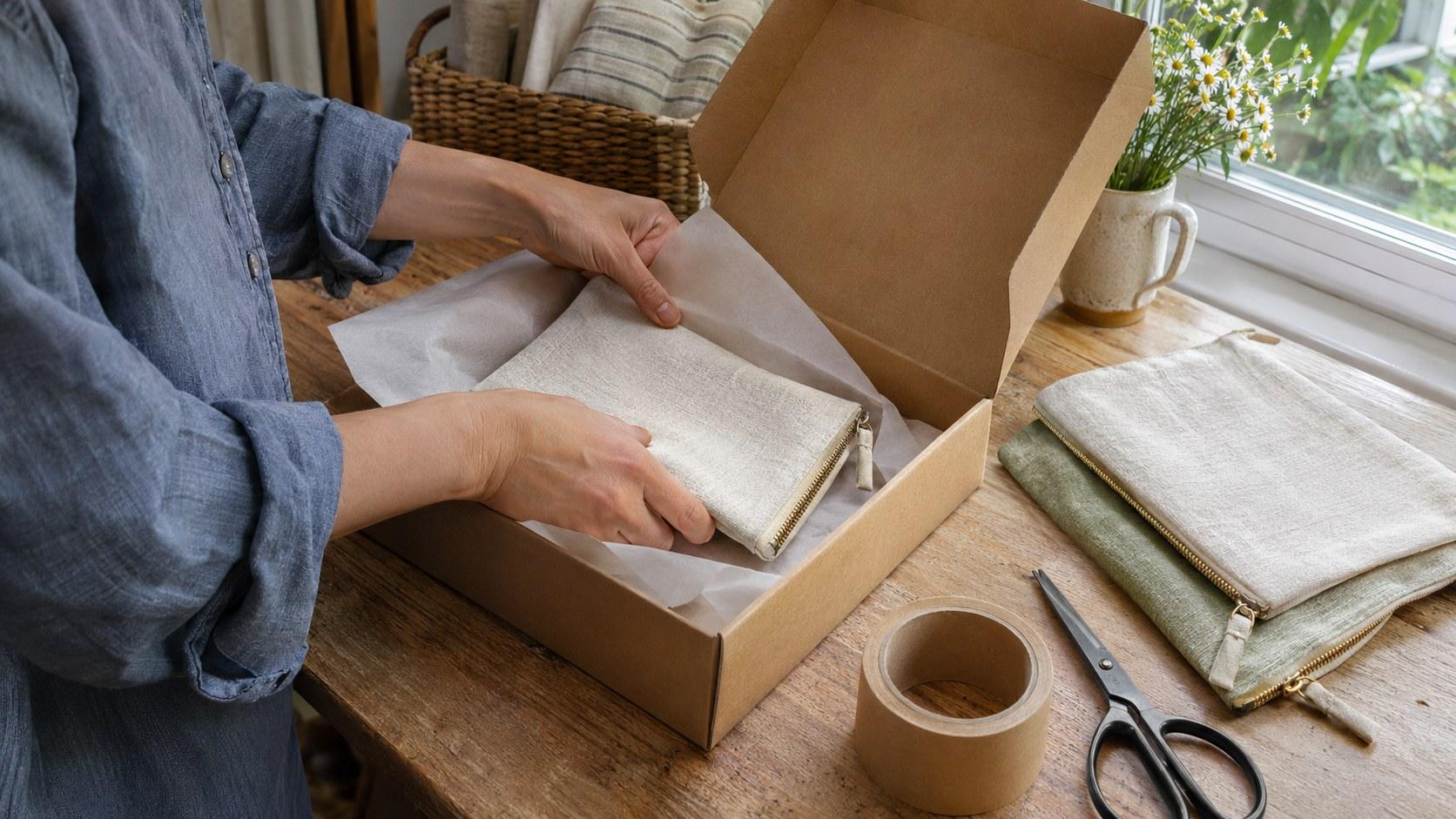
Useful packing orders TikTok videos show what a buyer receives and how you prepare it, without exposing who bought it. Set up a label-free filming area, record the product and packing sequence, and stop recording before adding shipping details. Build the post around one question a prospective customer actually has, rather than a long montage of boxes closing.
This is a practical filming workflow for small handmade-product sellers, not a promise that packing footage will increase sales. The aim is a clear post you can make during normal work without turning fulfillment into a production bottleneck.
Choose the buyer question before you set up the phone
“Pack an order with me” describes an activity. A useful opening tells the viewer what they will learn from watching it.
Pick one of these questions for today's post:
- What exactly comes with this pouch, print, or accessory?
- What changes when someone chooses gift wrapping?
- How do you keep a matching set together?
- What does the parcel look like before the mailing label goes on?
Choose a question you can answer with the products and materials already on your table. If you sell fabric pouches, show the pouch opening, the included accessory, and the finished wrap. Do not introduce a gift upgrade that is not actually available just because it looks good on camera.
Write the promise in one sentence: “Here is what comes inside the linen pouch gift set.” That sentence becomes the opening, the shot-selection rule, and the final edit check. Anything that does not help answer it can usually be shortened or removed.
If you need alternatives, use the free hook generator as a drafting aid. Reject any suggestion that invents scarcity, customer excitement, or an order volume you cannot substantiate.
Create a filming zone with no customer information
The simplest privacy edit is the one you never need to make. Separate your packing table into a camera area and an off-camera fulfillment area before recording.
Keep the following outside the camera area:
- Shipping labels, returns labels, and tracking barcodes.
- Packing slips, invoices, order numbers, and handwritten recipient notes.
- Laptop order screens and phone notifications.
- Other parcels with customer details facing the lens.
- Personal photos, calendars, and identifiable household information in the background.
A barcode is not harmless decoration. Treat it as potentially identifying information, even when you cannot read it yourself. Likewise, a customer asking you to film their order is not permission to publish their address or private message.
For a real order, keep your normal internal tracking process intact off camera. Do not remove operational checks or mix up products to make the table prettier. If maintaining that separation is difficult, record a demonstration pack with stock items instead. Say it is a demonstration, then put the items back into inventory using your normal process.
Avoid relying on blur as your first defense. Moving paper, reflections, and a single unblurred frame can defeat a rushed edit. Removing the information before filming is more dependable than trying to conceal it afterward.
Record five shots that answer the promise
For packing orders TikTok videos, a repeatable shot list saves more effort than inventing a new camera style every day. Set the phone on a stable support outside your normal reach for scissors, tape, and products. Test the framing with empty packaging first.
1. Show the actual contents
Start with a clear view of the product or set. Keep the items separated enough that viewers can understand what is included. If a decorative prop is not part of the purchase, remove it or make that distinction explicit.
2. Show one relevant detail
Open the pouch, reveal the lining, or show the size beside a familiar neutral object. Choose the detail that answers your opening question. This is not a full product tour; one useful close-up is enough.
3. Show the packing decision
Record the moment you wrap, separate, or arrange the items. Explain the reason in plain language: “I keep the two pieces together in this sleeve.” Avoid claiming packaging is damage-proof, waterproof, or environmentally superior unless you have appropriate evidence.
Follow your established shipping requirements, not whatever looks most satisfying on camera. This filming plan is not a substitute for packaging guidance for fragile, perishable, hazardous, or otherwise regulated goods.
4. Show the complete interior
Pause before closing so the viewer can see the finished arrangement. A top-down view can work, but an angled view may show depth better. Check that your hands are not covering the feature you promised to explain.
5. End on the label-free parcel
Close the package and stop filming. Add the real shipping label and complete your ordinary dispatch checks afterward, off camera. A closed box means it is packed; do not imply it has already been collected or delivered.
You do not need a fixed runtime. Keep each shot long enough to understand, then remove waiting, searching for supplies, and repetitive folding that adds no information.
Edit the process honestly
It is fine to compress repetitive work. It is not fine to make a demonstration look like a customer's real purchase, or to imply every order includes an extra that was added only for filming.
Keep the product consistent between shots. If you film a second take with another color or a different set, avoid joining the clips as though they document one continuous order. Either reshoot the missing shot or identify the sequence as an example.
Here is a hypothetical brief, not a customer result:
A handmade-accessories seller wants to explain a gift-set option. The opening shows the pouch and matching accessory. A close-up reveals the lining. The middle shows both items wrapped together. The final shot shows the plain closed parcel, before any customer details are added. The caption clarifies exactly which items are included.
The next post might answer “Can I choose the two colors separately?” That is more useful than inventing a dramatic order story. Only answer yes if that choice is actually offered.
Use sound that fits a commercial post
Natural tissue, zipper, and tape sounds can support a packing sequence without competing with its explanation. Turn off background music in the room before recording so an accidental song does not become part of the track.
TikTok's commercial music guidance recommends the Commercial Music Library for content promoting a brand, product, or service. It states that TikTok's licenses for music outside that library do not cover commercial use in content. If you use other music, you need the appropriate rights; a sound being popular is not proof of permission.
TikTok's content disclosure guidance says that posts promoting your own business must also have the content disclosure setting turned on. Check the publishing controls rather than assuming that only paid sponsorships count.
InsightTok AI can help organize a next-post plan around a hook, a niche-relevant sound, and a suggested posting window. For a shop post, check the proposed sound's commercial eligibility yourself. A recommendation is not a music license, and original packing audio may be the better creative choice.
Decide what to film next from useful questions
After posting, separate enjoyment from purchase-related uncertainty. “Love the sound” and “Does the set include both pieces?” are different signals. Neither is a confirmed sale, but the second identifies information your next post could clarify.
TikTok Studio's official guide describes account and video analytics, viewer activity times, and engagement insights. Use the fields available in your interface; tools and availability can differ.
Review the post alongside comparable product or packing posts after the same observation period. Note the question answered, opening shot, approximate length, audio choice, posting window, and available results. Do not attribute a change in views to the hook alone if you also changed the product, timing, and format.
Use one observation to choose one follow-up:
- Repeated inclusion questions: show the complete set more clearly.
- Gift-option questions: compare standard and gift presentation honestly.
- Questions about a hidden detail: film a separate close-up explanation.
- Enjoyment with little product understanding: identify the item earlier.
You can use the free account scan to review your public-account data before committing to another format. InsightTok AI's Next Post Studio then helps turn a chosen question into a workable next-post plan. Treat its timing recommendation as a test window, not a guarantee of orders or reach.
Check the exported video before posting
Watch the export once at normal speed for clarity, then inspect the label-risk moments frame by frame. Look at the edges of the image, reflections, and transitions, not just the main product.
Confirm that the included items match the offer, no customer information appears, the audio is appropriate for commercial use, and the ending does not imply dispatch has already happened. Check the caption and cover frame too.
The best starting point for packing orders TikTok videos is one real buyer question, one honest sequence, and a filming setup you can reuse without delaying shipments. When you have that question, start planning your next post.
InsightTok AI Team
Expert in TikTok growth strategies and social media analytics. Helping creators reach millions with data-driven insights and AI-powered recommendations.
Ready to Grow Your TikTok?
Get AI-powered analytics and content recommendations to boost your views and engagement.
Start Free TrialRelated Posts
TikTok Creator Health Rating Penalty Recovery 2026: Protect Your Reach and Monetization
Learn how to distinguish a real TikTok account penalty from ordinary performance volatility. Follow a practical recovery and prevention plan designed to protect reach, eligibility, and creator revenue.

The TikTok Search-to-Subscription Funnel 2026: Turn Searchable Content Into Recurring Revenue
Learn how to convert TikTok search traffic into recurring subscription revenue. This guide covers content strategy, profile optimization, offer design, metrics, and a practical 30-day plan.

TikTok Guitar Tutorials: Show the Chord Change, Not Just the Shapes
A filming workflow for guitar creators: show the movement between chord shapes, preserve honest instrument audio, and turn learner questions into a focused next lesson.