
Key Takeaways
What you'll learn in this article
- Wavy lines or crawling colors confined to fine fabric patterns can be moiré, not a flickering lamp or a TikTok account problem.
- Test camera distance and angle before changing every recording setting or buying equipment.
- Review a saved moving clip and its final export; a clean camera preview is not enough.
- If the garment is the subject, preserve its actual pattern instead of hiding the problem with heavy smoothing.
Key Takeaways
- Wavy lines or crawling colors confined to fine fabric patterns can be moiré, not a flickering lamp or a TikTok account problem.
- Test camera distance and angle before changing every recording setting or buying equipment.
- Review a saved moving clip and its final export; a clean camera preview is not enough.
- If the garment is the subject, preserve its actual pattern instead of hiding the problem with heavy smoothing.
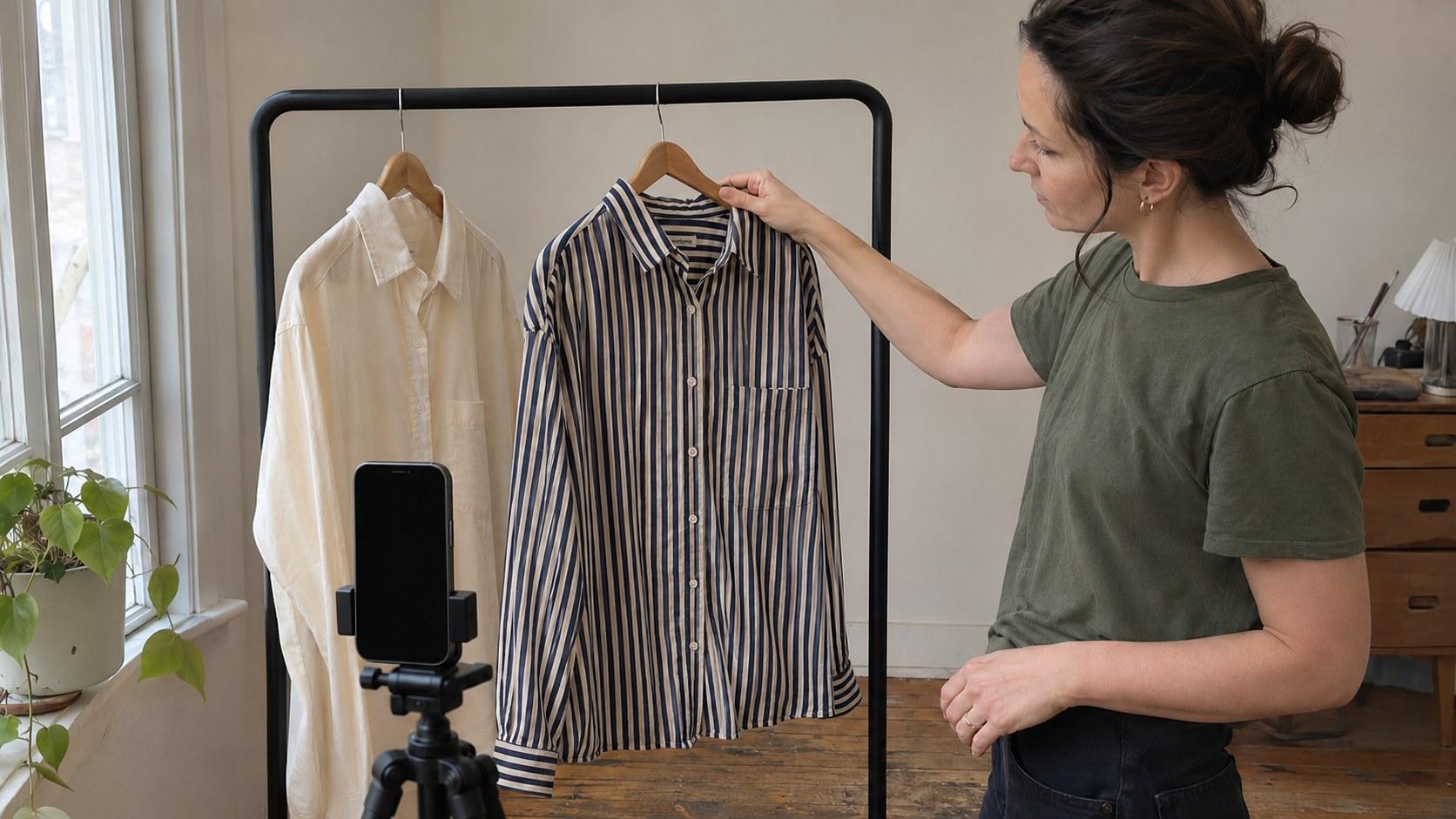
When striped clothes look wavy in TikTok videos, the likely culprit is moiré: an unwanted pattern created when fine repeating detail interacts with digital image sampling. Start by recording the garment from a slightly different distance and angle, then inspect the saved clip. If the clothing is incidental, changing to a plain top is often the simplest fix. If you are reviewing the garment itself, change the shot—not the product you promised to show.
This guide is for outfit reviewers, sewing creators, and talking-head educators whose fabric seems to ripple or develop false colors on camera. The workflow below is practical production guidance, not a claim about TikTok distribution or a guarantee that one setting fixes every phone.
Confirm that the pattern—not the whole room—is moving
Watch the affected area alongside a plain wall, your face, and another object. Moiré often follows a tight repeating texture: pinstripes, small checks, herringbone, or a fine weave. The clothing can look steady to your eyes while the recording shows larger waves or strange bands across it.
Nikon's image-artifacts guidance explicitly identifies fine grids and regularly repeating patterns as possible sources of moiré. It recommends testing subject distance, angle of view, shooting angle, and slight defocus. Those are camera principles, not instructions that every phone exposes identical controls.
Use these clues to choose your first test:
- Pattern-local waves: change the garment's size or orientation in the frame.
- Brightness pulsing across plain surfaces too: investigate lighting rather than assuming fabric moiré.
- The entire subject repeatedly becoming sharp and soft: check focus behavior separately.
- Artifacts visible only in one playback window: compare another display or viewing size before reshooting.
These symptoms can coexist. Do not diagnose from one paused thumbnail, and do not assume a striped shirt is defective because the camera struggles to represent it.
Find the stage where the artifact appears
Keep the original recording. Compare the same movement in the camera file, your edited export, and the upload preview or existing published post. You are identifying where the problem becomes visible, not trying to prove a platform is responsible.
If the original already has waves, begin with the filming setup. If the original is clean but the export is not, duplicate the editing project and test a short section without added sharpening, texture enhancement, or unnecessary resizing. If only one display looks wrong, try another screen and a different playback size.
Digital sampling is not limited to the camera. A SAS explanation of striped clothing on video describes how digitizing a shirt and shrinking the resulting image can introduce artifacts. That explains why an acceptable large preview is not sufficient evidence that the final small-screen version will look the same.
Avoid making repeated downloaded copies while troubleshooting. Work from the original file so you are not adding another processing step with every test. Label your test clips by the change you made, such as “closer” or “slight side angle,” rather than relying on memory.
Run a simple distance-and-angle test
When striped clothes look wavy in TikTok videos, a physical adjustment is a better starting point than a random list of export presets. Keep the same phone, recording app, light, and garment while testing the following sequence.
1. Record your current framing
Capture a short baseline that includes stillness and the movement you actually need: turning your shoulders, lifting a sleeve, or showing the fabric drape. Keep the recording long enough to see whether the pattern crawls during motion.
Check the saved file, not only the live preview. Note the part of the garment that is affected and whether the false pattern changes as the fabric moves.
2. Move the camera closer
Try a closer view that makes the repeating detail larger in the image. Maintain a useful composition and enough distance for the camera to focus. Record the same movement again.
Do not immediately crop the closer shot back into the old composition; that adds another variable. The point is to see whether a different pattern scale gives you a cleaner, usable view. Moving farther away is another test if the closer composition cannot serve the lesson, but neither direction is a universal cure.
3. Change the viewing angle
Move slightly to one side or rotate the garment modestly, then repeat the clip. Compare the recording rather than judging the angle by how promising it looks in person.
For a clothing review, keep enough straight-on footage to communicate the actual cut and fit. An oblique angle that hides both moiré and the feature under discussion is not a successful repair.
4. Stop when the shot does its job
Select the version that preserves the relevant detail with the least distracting interference. Check it at normal speed, at a larger viewing size, and in the final vertical export. You do not need to eliminate every imperfection visible at extreme magnification if ordinary viewing remains clear and faithful.
Write down the working distance, camera position, recording mode, and garment movement. Retest if any of those changes during the session.
Choose a different fix for incidental clothing and featured clothing
If you teach spreadsheets while wearing a fine-striped shirt, the shirt is not the lesson. A plain top or a larger, less intricate pattern can remove a distraction without changing the content. Keep a tested spare top near your filming setup for batch sessions.
If you teach sewing or review that exact shirt, swapping it defeats the purpose. Instead, split the visual explanation into two honest shots:
- A wider view that establishes shape, fit, or drape.
- A closer view that lets viewers inspect the real stripe, weave, or stitching.
For example, a hypothetical sewing creator could explain sleeve fit in a medium shot, then cut to a stable close-up of the seam. This is a production example, not a reported creator result. The close-up must still show the same garment and the detail being discussed.
Do not present heavy blur as a faithful fabric demonstration. If the camera cannot resolve a subtle texture adequately, say so rather than implying the material is smooth or a different color. The goal is a useful representation, not merely a clean-looking frame.
Can you repair footage you already recorded?
Start with a duplicate project and a short affected section. Remove extra sharpening first if you applied it. If your editor provides a localized softening or moiré-related control, test it conservatively and inspect the result in motion.
A still frame may look improved while the moving pattern remains distracting. A mask may also slip as a sleeve or shoulder moves. Watch edges, stitching, and skin near the correction; reject a repair that damages the information viewers need.
Nikon includes slight defocus among its capture suggestions, but that does not make intentional blur the first choice for every creator. Keeping a presenter's face sharp or showing garment construction can matter more than suppressing every artifact. Test distance and angle before sacrificing detail.
Sometimes a clean pickup shot is the better repair. Retain usable narration, refilm the fabric detail, and make the edit transparent. Avoid replacing an essential demonstration with unrelated footage just to hide the defect. No software can be assumed to reconstruct the true weave from a badly distorted recording.
Turn the clean test into your next post
Once the footage works, return to the viewer's question. A filming problem can consume the whole session without improving the actual lesson. Write one sentence naming what the viewer will learn, then choose only the shots necessary to prove it.
A fashion creator might answer whether a sleeve restricts movement; a sewing creator might show how a seam sits after pressing. Use the free hook generator for alternative wording if helpful, but reject any opening the footage does not support.
InsightTok AI's Next Post Studio can help organize that next-post plan with hook options, a niche-relevant rising sound, and a personalized posting time. It does not diagnose moiré or repair footage. Keep music secondary when the explanation or fabric sound matters, and treat a suggested posting window as a planning input rather than a reach promise.
If striped clothes look wavy in TikTok videos again, return to the saved test instead of restarting your entire setup. Keep a reference clip and one production note alongside your content brief. More creator workflow guides can help with a different issue after this one is resolved.
For help organizing the next idea, hook, sound, and posting window, create an InsightTok AI account.
InsightTok AI Team
Expert in TikTok growth strategies and social media analytics. Helping creators reach millions with data-driven insights and AI-powered recommendations.
Ready to Grow Your TikTok?
Get AI-powered analytics and content recommendations to boost your views and engagement.
Start Free TrialRelated Posts

Build a Creator-Owned Recommendation Engine: Turn TikTok Traffic Into Recurring Revenue
Build a creator-owned recommendation engine that converts TikTok viewers into subscribers and recurring customers. Learn how to validate your idea, structure the database, price access, and avoid creator burnout.

How to Build Sustainable TikTok Income Without Creator Burnout: The 2026 Pacing Framework
Learn how to balance content production, analytics, monetization, and recovery without sacrificing TikTok growth. This practical pacing framework helps creators build reliable income around a workload they can sustain.
Why You Meet TikTok Monetization Requirements but Remain Account-Locked in 2026
Meeting TikTok’s visible thresholds does not always guarantee monetization access. Use this practical 2026 framework to audit account health, originality, audience quality, commercial disclosures, and appeal evidence.