
Key Takeaways
What you'll learn in this article
- Choose one material question before recording: surface texture, stretch recovery, or drape.
- Test soft side light so the weave or knit has visible depth without exaggerated contrast.
- Combine a steady detail shot, one gentle action, and a wider view of the garment.
- Show what the camera can demonstrate; do not treat a close-up as proof of softness, fiber content, or durability.
Key Takeaways
- Choose one material question before recording: surface texture, stretch recovery, or drape.
- Test soft side light so the weave or knit has visible depth without exaggerated contrast.
- Combine a steady detail shot, one gentle action, and a wider view of the garment.
- Show what the camera can demonstrate; do not treat a close-up as proof of softness, fiber content, or durability.
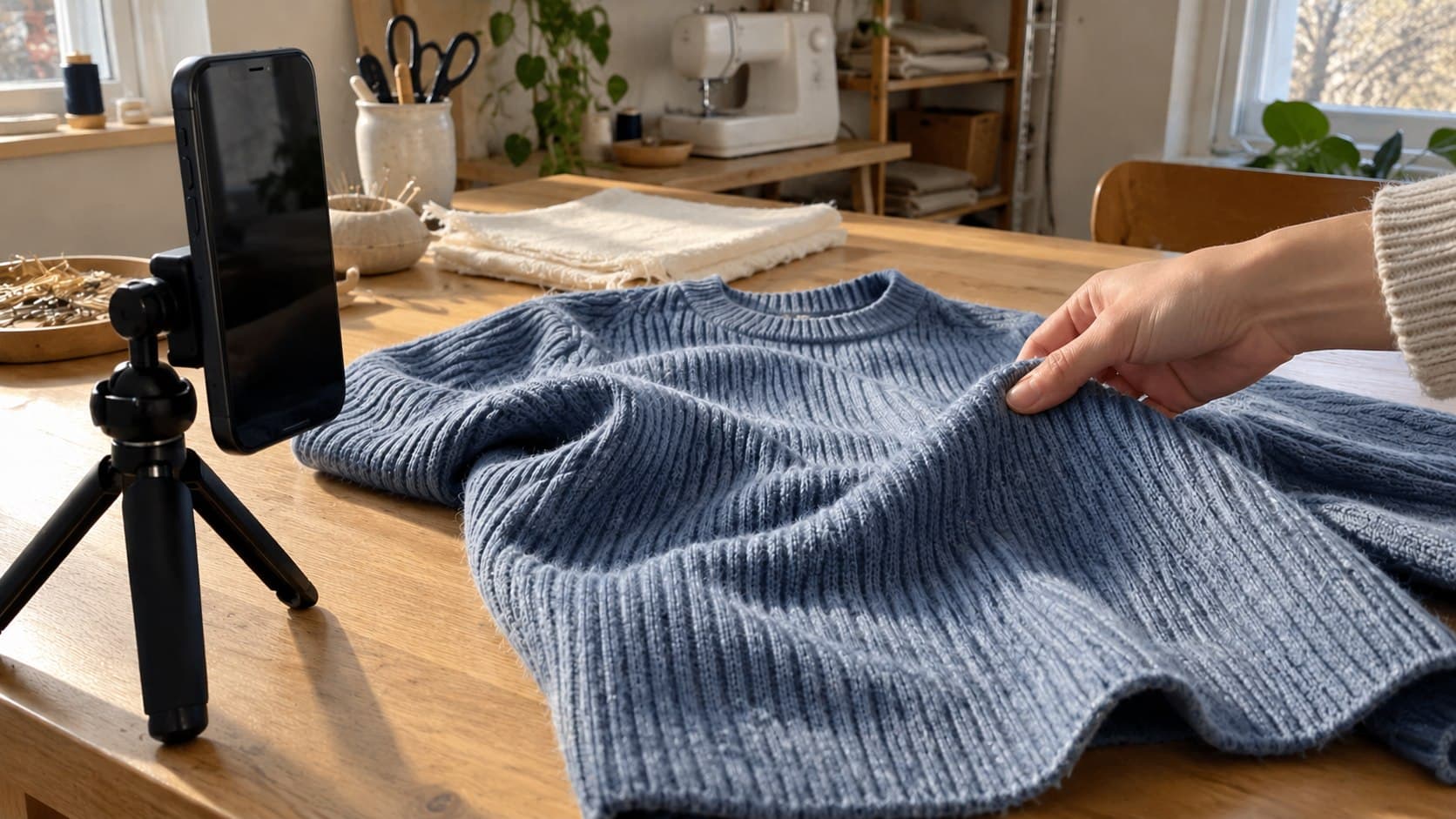
To show fabric texture on TikTok, record a steady close-up with light coming from the side, then add one movement that reveals how the material behaves and a wider shot that restores context. A ribbed sweater needs visible ridges; a fluid skirt needs a clear view of its folds moving. Getting closer is not the whole solution. The viewer needs to understand which property they are seeing.
This workflow is for fashion, sewing, thrift, and clothing-review creators whose garments look flat on camera even when the footage is sharp. It turns a vague “look at this fabric” clip into a useful answer you can build your next post around.
Pick the question your footage can actually answer
Start with a question from your comments or one you would ask before choosing the garment. Write it as a sentence rather than a broad topic such as “quality.”
Useful questions include:
- Are those raised ribs or a printed stripe?
- Does the fabric hang in soft folds or hold a more structured shape?
- What does the inside surface look like?
- How does this small section return after a gentle stretch?
Choose one primary question. A single demonstration becomes confusing when it tries to establish texture, fit, opacity, warmth, and durability at once.
Separate visible evidence from personal judgment. You can show the inside of a sweater and describe how it feels to you. You cannot prove that nobody will find it itchy. Likewise, a stretch demonstration is not a laboratory test of long-term recovery. Keep the claim as narrow as the footage.
Make the surface readable before you move the phone
Lay the relevant area on a stable surface near a window. Start with one main light direction and remove distracting items from the background. Keep the garment in its ordinary condition; do not stretch it flat simply to make the weave look more dramatic.
Record two short tests without changing the camera position:
- Turn the fabric so the light falls more directly onto its face.
- Turn it again so the light travels across the surface from one side.
Compare the saved clips. In the second setup, small shadows may make ribs, loops, or raised stitching easier to distinguish. Use the gentlest angle that reveals the structure. Deep black shadows and bright highlights can exaggerate how rough or shiny the material looks.
If the far side disappears into darkness, place a plain white card nearby to bounce some light back. Move it away if the surface becomes flat again. For a shiny material, try a softer window position or change the fabric angle rather than forcing a harsh highlight across the whole shot.
These are practical filming tests, not fixed settings that suit every fabric. The right setup is the one that makes this garment understandable and believable.
Get close enough to see the structure, not so close you lose context
Clean the lens, support the phone, and record a brief stationary take. Check the saved video at normal phone-viewing size. Can you distinguish the feature without pinching to zoom?
If not, move a little closer and test again. Stop when focus becomes unreliable. A bigger blur is less useful than a smaller, sharp detail.
On supported iPhones, Apple's macro photo and video guide explains that Camera can switch to the Ultra Wide camera for close-up capture. Apple also recommends backing up or choosing .5x if the image becomes blurry after disabling automatic macro switching. Those instructions concern supported devices and the Camera app; do not assume the same controls appear in TikTok's recorder.
Macro is optional. If the ribs or weave are already readable, a wider close-up often communicates more. Keep a seam, cuff, or edge visible so viewers know which part of the garment they are looking at.
Record a surface-action-drape sequence
A useful way to show fabric texture on TikTok is to give each shot a different job. Record them separately rather than trying to push the phone continuously from the full garment into an extreme close-up.
Shot one: Show the surface at rest
Frame the feature and hold still. Let viewers see the raised knit, brushed inside, diagonal weave, or smooth face before a hand enters.
Avoid sweeping fingers across the exact detail you are explaining. If you point, move your hand aside before the important hold. The purpose is observation, not constant motion.
Shot two: Demonstrate one behavior
Match the action to the question:
- For stretch recovery, gently extend a small section and release it in one continuous take.
- For surface direction, brush the material once and show the resulting change, if any.
- For stiffness, lift an edge and let it settle naturally.
- For inside-versus-outside texture, turn over the same section without hiding which side is which.
Do not pull hard enough to damage the item. Avoid cuts in the middle of an action whose result matters. If the fabric returns slowly, show that honestly instead of cutting directly to a neat final state.
Shot three: Restore the wider view
Show the whole relevant panel or garment. Let a fold hang or show the item on a hanger or person when appropriate.
A close-up describes surface structure; the wider view explains where that structure sits and how the garment hangs. Neither substitutes for the other. Keep the same item and lighting so the edit does not imply a comparison you did not actually film.
Edit around the evidence, not around every beat
Choose the opening sentence after checking which shot answers your question most clearly. Specific hooks are easier to deliver honestly:
- “Here is the inside of this sweater, not just the outside.”
- “This rib looks flat from a distance. Here is the close-up.”
- “Watch how this fabric falls when I stop holding it.”
The hook generator can help develop alternatives, but discard any line that promises a test your footage does not contain.
Hold the decisive moment long enough to understand at ordinary playback speed. Do not cut away solely because the music reaches its next beat. Keep captions clear of the surface being shown, and review the sequence with sound off to check whether the action still makes sense.
Avoid heavy sharpening, smoothing, or contrast changes that alter the visible material. Watch the exported clip as well as the editing preview. If the detail disappears after export, fix that stage before deciding you need to reshoot.
Example: One useful post about a rib-knit cardigan
Imagine a sewing creator whose viewers ask whether a cardigan's ribbing is raised or simply a color pattern. This is a hypothetical planning example, not a customer result.
The creator records the cuff resting beside a window. A side-lit angle reveals the ridges. Next, they gently bend the cuff so the structure remains visible across a fold. Finally, they show the sleeve at normal viewing distance.
The opening is: “These are raised ribs—here is what they look like up close.” The narration identifies the structure without claiming that the fabric is warmer, softer, or more durable than an alternative.
That post answers one question completely. A later post could address the inside finish or how the garment hangs, using new evidence rather than stretching this clip into a general quality review.
Turn the demonstration into your next-post plan
Before filming, write down the question, opening line, decisive action, and final context shot. This is enough of a brief to keep the recording session focused.
InsightTok AI's Next Post Studio can help connect that idea to useful hooks, a niche-relevant rising sound, and an account-specific posting time. Treat the sound as an optional supporting choice, not a reason to obscure narration or rush the demonstration. A suggested posting window is a planning input, not a promise of distribution.
After posting, review the available performance data alongside the comments. TikTok's Studio documentation describes account and video analytics, including viewer information and engagement insights. Tools and availability can differ across interfaces and locations.
Ask whether viewers understood the material question. Repeated requests to see the inside suggest missing evidence; questions about another garment may suggest a useful next demonstration. Compare similar posts after the same observation period rather than attributing a single result to the lighting change.
InsightTok AI's creator analytics and planning tools can support that review. Keep your next test narrow: improve the opening or add the missing context shot, rather than changing the topic, format, sound, and timing together.
Your pre-post fabric check
Before you show fabric texture on TikTok, confirm that:
- The important surface is visible on a normal phone screen.
- The demonstration supports the exact spoken claim.
- Lighting and editing have not disguised the material's appearance.
- The viewer sees both the detail and enough garment context.
- Any personal assessment is clearly presented as your experience.
You do not need a more elaborate production. You need a clear material question and footage that answers it. To turn that question into a focused next-post brief, start with InsightTok AI.
InsightTok AI Team
Expert in TikTok growth strategies and social media analytics. Helping creators reach millions with data-driven insights and AI-powered recommendations.
Ready to Grow Your TikTok?
Get AI-powered analytics and content recommendations to boost your views and engagement.
Start Free TrialRelated Posts
Why Your TikTok Creator Card Sits Unused While You Wait 30 Days for Platform Payouts: The Creator Business Banking Framework
Learn how to leverage the TikTok Creator Card and InsightTok AI for improved financial management and faster creator payouts.
How to Film Steam for TikTok Food Videos With a Phone
Film steam for TikTok food videos with simple phone framing, side-backlight, a dark background, and a safe recording plan that keeps the recipe useful.
Why Your TikTok Creator Payments Arrive 30-90 Days Late While Competitors Get Paid Upfront: The Creator Cash Flow Crisis Framework
This post explores the causes of late TikTok creator payments and presents a framework to manage the creator cash flow crisis. It covers negotiation strategies, escrow, and invoice factoring lines.