
Key Takeaways
What you'll learn in this article
- Show the same patch of wood under ordinary light and low side light so viewers can see what the inspection reveals.
- Keep the board, camera, and inspection light in repeatable positions for the before-and-after check.
- Separate revealing a scratch from removing it; changing the light is not a repair.
- Build the next post around one identifiable surface problem, then review viewer questions alongside comparable video performance.
Key Takeaways
- Show the same patch of wood under ordinary light and low side light so viewers can see what the inspection reveals.
- Keep the board, camera, and inspection light in repeatable positions for the before-and-after check.
- Separate revealing a scratch from removing it; changing the light is not a repair.
- Build the next post around one identifiable surface problem, then review viewer questions alongside comparable video performance.
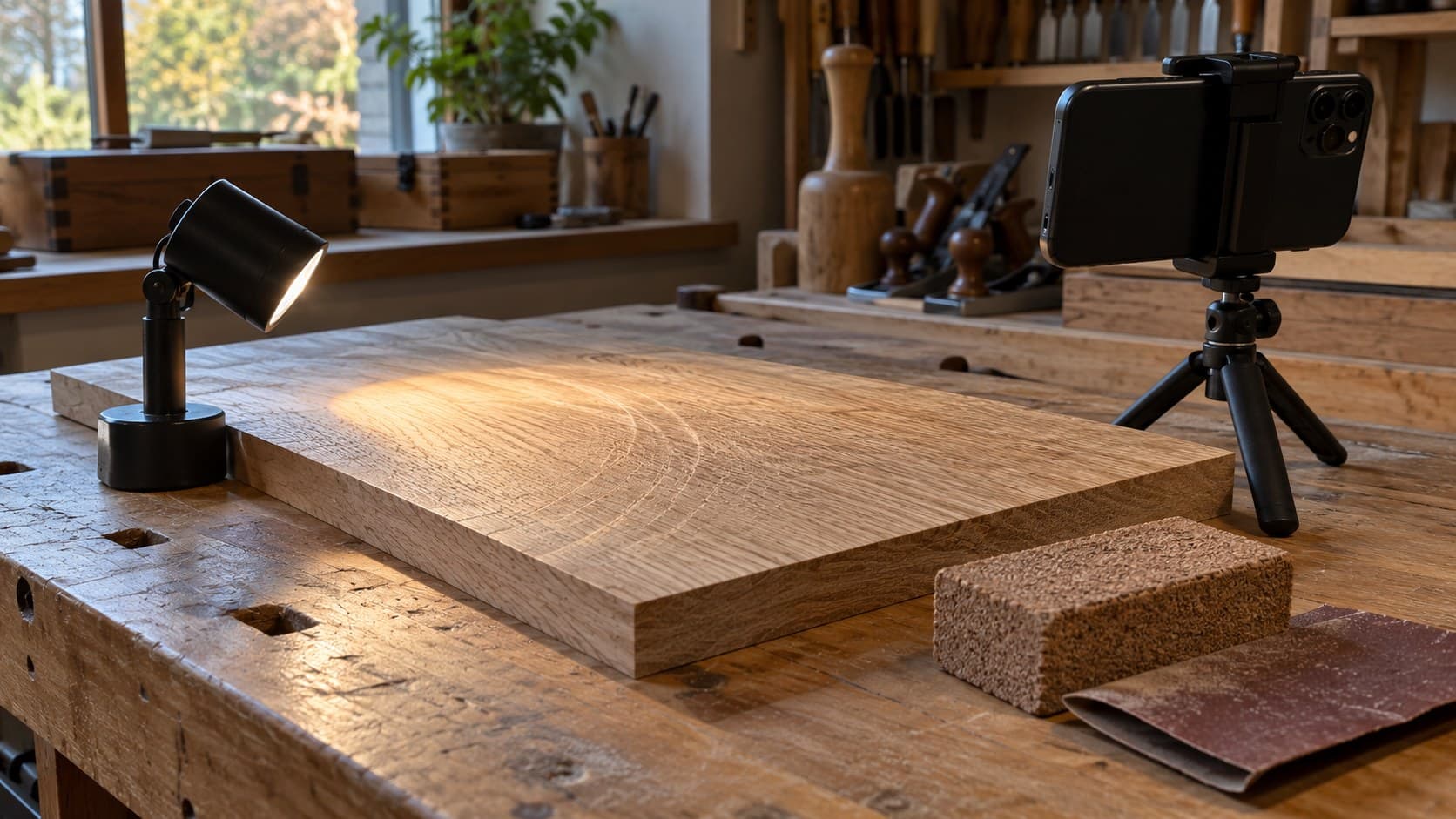
The most useful woodworking TikToks about sanding show a defect the viewer can recognize, the correction, and a repeatable inspection afterward. Place a small light low beside an unfinished board, let it shine across the surface, and record the same patch before and after your work. If the scratches disappear only when you move the light, you have changed the demonstration—not shown that the sanding worked.
This is a filming workflow for woodworking educators, not a universal sanding schedule. Wood species, veneer thickness, abrasives, tools, and finish requirements differ. The goal is to make your actual surface-preparation lesson visible on a phone without turning a flattering reveal into misleading evidence.
Start with a scratch, not a complete furniture build
A polished tabletop reveal can look satisfying while teaching very little about the decision immediately before finishing: does this surface need more preparation?
Choose one problem you can show clearly. It might be a visible sanding swirl, a cross-grain scratch, or an area that still carries marks from an earlier step. Avoid combining all three into one short lesson. They may require different explanations, and the viewer needs to know exactly what to look for.
Use a practice offcut when possible. Do not damage a finished commission or aggressively sand thin veneer merely to create dramatic footage. If you deliberately prepare a sample with a defect, say that it is a demonstration sample.
Before recording, write one sentence describing the observable outcome: “You will be able to find this curved sanding mark before applying finish.” That is more useful than promising a flawless finish or claiming one trick prevents every surface problem.
Use raking light to reveal the surface
Raking light means directing light across a surface at a low angle rather than illuminating it only from above. In Fine Woodworking’s guide to catching scratches before finishing, Mike Tracz explains how that low angle helps flaws stand out through shadow.
For your video, begin with the board under the usual shop lighting. Then bring a small inspection light into position beside it. Record the transition so the viewer understands that the same wood can look different depending on how it is lit.
Try the light from more than one direction during setup. A direction that reveals one mark may not reveal another. Choose a position that makes the specific defect readable without washing out the entire surface, and preserve that position for the later comparison.
You do not need a cinematic lighting rig. You need a stable, repeatable inspection setup. Keep light stands and cables clear of the work area, and avoid balancing a hot or unstable lamp on the board.
Make the patch identifiable on a small screen
Start with a wider shot that establishes the board and the location of the defect. Then move closer for the inspection. A distinctive grain feature can help viewers recognize that you are showing the same area throughout the lesson.
Place a removable reference marker beside the inspection area, outside the section you will sand. Do not obscure the scratch or introduce adhesive residue into the surface you are preparing. You can also photograph the setup for your own continuity notes.
Check these details before filming the entire sequence:
- The defect is visible in a normal phone-size preview, not only on a large editing monitor.
- The camera is focused on the wood rather than on a hand or the lamp behind it.
- The bright area is not so overexposed that the scratch disappears.
- The framing includes enough grain to identify the same patch later.
- There is room for captions without covering the evidence.
If your phone offers focus and exposure controls, use them to reduce distracting changes between shots. Otherwise, keep the composition steady and record a short test. Avoid excessive digital zoom or sharpening that makes ordinary grain look like damage.
Record four shots that prove different things
For woodworking TikToks, the strongest sequence is not necessarily the fastest edit. Each shot should answer a distinct question about the surface.
1. Establish the starting condition
Show the board under ordinary light and explain why it could appear ready. Do not call it smooth solely because the camera cannot see a defect. Then identify the patch you will inspect.
A useful narration is: “From here this looks ready. Watch this area when I move the inspection light.” The line makes a limited, testable promise.
2. Reveal the mark
Bring in the low side light and pause long enough for the viewer to locate the scratch. Point beside the mark rather than covering it. If you add an arrow in editing, check its placement against the final crop.
Explain what the viewer is seeing without pretending every visible line is a sanding defect. Grain, pores, and other natural features can remain visible on properly prepared wood. If identification is uncertain, choose a clearer sample instead of making a confident diagnosis.
3. Show the correction honestly
Demonstrate the appropriate next preparation step for your material and finish. State the abrasive or method you actually use and why it fits this sample; do not turn it into a rule for every project.
Keep normal dust control and protective practices in place. Stop active work before adjusting the phone or light. A close-up is not worth putting equipment or your hands in an unsafe position.
You can shorten repetitive sanding in the edit, but disclose the cut. “After another pass and cleanup” is clearer than making a jump cut look like a single magical swipe. Follow the relevant material and finish guidance for removing dust before inspection.
4. Repeat the inspection
Return the board, camera, and light to their reference positions. Show the same grain feature and inspect the same patch. If a mark remains, show it and explain that another check or correction is needed.
Do not use a dimmer light, a new camera angle, a beauty filter, or a wet surface to manufacture the after shot. If you later apply finish, label that as a separate stage. A glossy reveal can close the story, but it does not replace the comparable inspection.
Write a hook that the footage can support
The opening should name the hidden decision, not promise perfection. Try these as original script options:
- “Before you finish this board, look at it from here.”
- “This sanding mark disappears on camera—until I move the light.”
- “I am checking the same patch again, not just filming a better angle.”
Use the option your footage actually demonstrates. If the mark is obvious under ordinary lighting, do not pretend it was invisible.
The free hook generator can help you explore wording, but keep the inspection evidence in charge of the promise. Avoid claims such as “the algorithm loves workshop videos” or “this lighting trick guarantees saves.” Neither follows from a clear demonstration.
Keep music below important narration, and let the inspection shot last long enough to be examined. A beat-synced transition is optional; seeing the mark is the point.
Turn the inspection into an account-informed next post
Once you have a useful demonstration, decide which audience question it answers. A beginner may need help locating the scratch. A more experienced viewer may want to understand why a particular mark survived the previous preparation step. Those are different posts, even when they use the same board.
InsightTok AI can help package that choice through Next Post Studio: a next-post plan with useful hooks, a niche-relevant rising sound, and an account-informed posting time. Use those suggestions around the woodworking lesson, not as a reason to change the lesson into an unrelated trend.
Keep a compact production brief:
- Audience: the specific experience level you are teaching.
- Question: what the viewer should be able to identify afterward.
- Evidence: the reference patch and repeatable inspection shots.
- Hook: the promise your footage can prove.
- Follow-up: the next question this demonstration leaves unanswered.
You can review the broader planning tools on the InsightTok AI homepage. The benefit is a more deliberate next filming session, not a guarantee that a particular sound or posting window will increase reach.
Review understanding separately from views
TikTok’s official TikTok Studio documentation describes account and video analytics, including viewer activity times and engagement insights. Use the fields available in your interface; features and access can vary.
Compare this tutorial with your other short workshop explanations rather than with a completely different finished-project reveal. Use the same observation period and note meaningful differences in topic, length, and presentation. A single post cannot isolate lighting as the cause of a performance change.
Read comments for specific confusion. “Which line is the scratch?” suggests the evidence needs clearer framing. “What abrasive did you use next?” suggests a possible follow-up about the correction. Neither question alone proves the entire audience wants a long sanding series.
Before publishing more woodworking TikToks on this topic, ask someone unfamiliar with the footage to identify the mark and explain how you checked the result. If they cannot, improve the demonstration before multiplying the format.
Your final check is simple: same patch, comparable light, honest correction, readable result. When you want help turning that lesson into a focused publishing plan, start with Next Post Studio.
InsightTok AI Team
Expert in TikTok growth strategies and social media analytics. Helping creators reach millions with data-driven insights and AI-powered recommendations.
Ready to Grow Your TikTok?
Get AI-powered analytics and content recommendations to boost your views and engagement.
Start Free TrialRelated Posts

Why Original TikTok Videos Get Flagged as Reused Content—and How to Appeal
Discover why original TikTok videos can receive reused-content flags and how to build a credible appeal. Follow a practical framework for preserving evidence, diagnosing similarity triggers, and protecting future revenue.

Acrylic Painting TikToks: Show the Wet-to-Dry Color Shift Clearly
A practical filming workflow for art creators: document one acrylic mixture, compare fresh and dried swatches, and teach viewers to check the finished color.
TikTok Cooking Tutorials: Show Doneness Without Guessing From Color
A filming workflow for recipe creators: show genuine temperature checks, separate safety from texture, and make the cooking endpoint clear on a phone screen.