
Key Takeaways
What you'll learn in this article
- Show the raw edge, stitch line, and space between them before demonstrating a seam at the machine.
- State the allowance required for your example; do not imply that every pattern uses the same measurement.
- Film a marked sample, the fabric aligned with the machine guide, and the finished seam as three separate pieces of evidence.
- Build the next post around the measurement viewers cannot reproduce, not another full-project montage.
Key Takeaways
- Show the raw edge, stitch line, and space between them before demonstrating a seam at the machine.
- State the allowance required for your example; do not imply that every pattern uses the same measurement.
- Film a marked sample, the fabric aligned with the machine guide, and the finished seam as three separate pieces of evidence.
- Build the next post around the measurement viewers cannot reproduce, not another full-project montage.
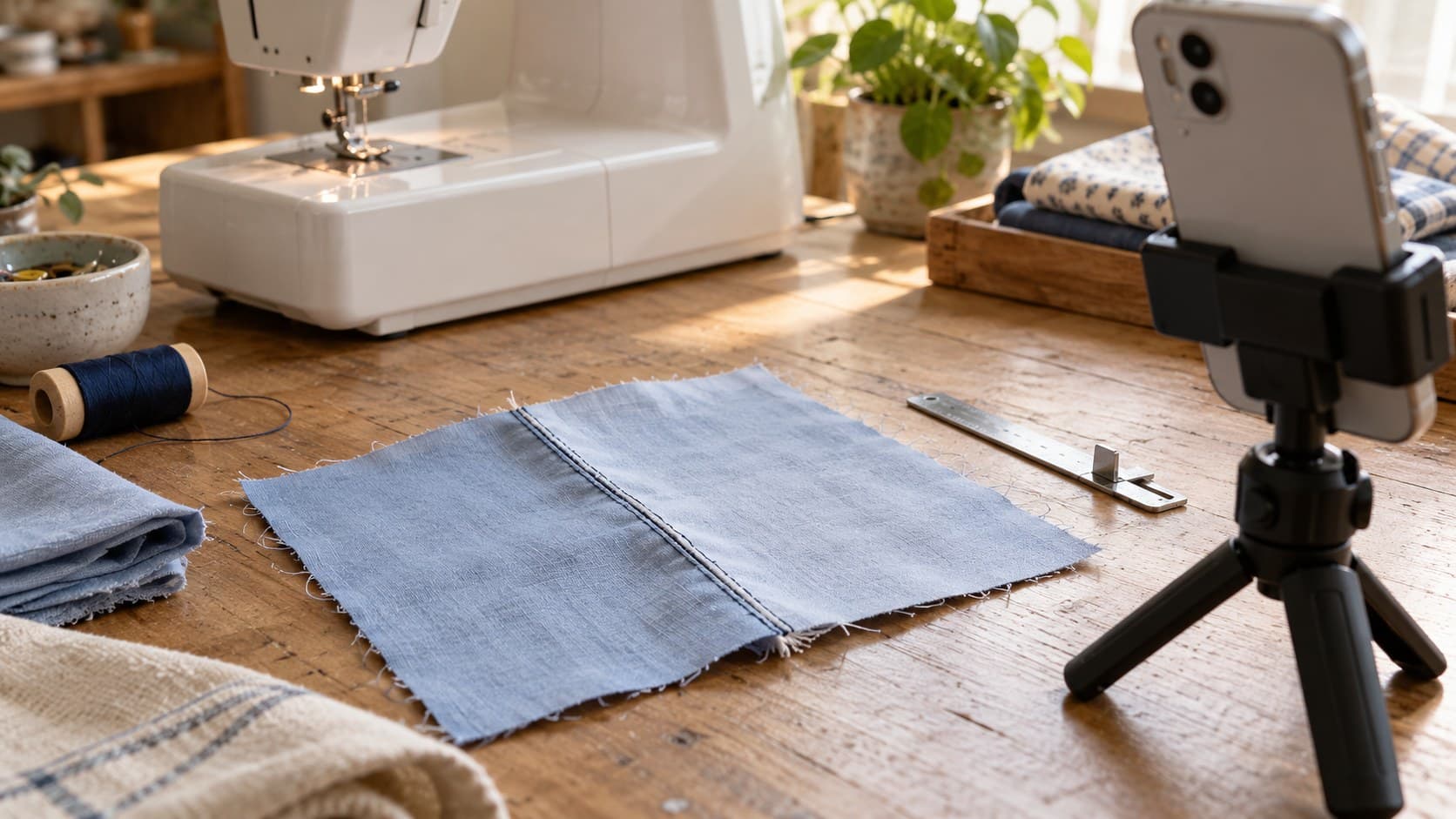
To make TikTok sewing tutorials easier to follow, show exactly where the stitch line sits in relation to the cut fabric edge, name the allowance used in your example, and demonstrate how you maintain it. A close-up of a moving needle is not enough if the viewer cannot see which edge or guide controls the distance.
This workflow is for sewing creators whose clear-looking demonstrations still leave a practical question unanswered: “Where am I supposed to sew?” It focuses on filming a basic straight-seam explanation, not prescribing one seam allowance for every project. The production suggestions below are teaching choices, not claims about TikTok's recommendation system.
Choose the measurement question before filming
Separate three questions that can sound similar in comments:
- “What is seam allowance?” needs a visible definition.
- “How much should I leave?” needs the instruction for the particular pattern or project.
- “How do I keep it even?” needs a clear view of alignment while sewing.
Pick one as the main promise. You can briefly establish the others without turning the video into a complete introduction to garment construction.
Seamwork's basic seam guide defines seam allowance as the distance between the stitch line and the raw edge. It also says to consult the pattern instructions for the recommended allowance. That gives your lesson two important boundaries: identify both reference points, and distinguish your demonstration value from a universal rule.
Before recording, write a one-sentence brief: “Show a beginner how the raw edge stays aligned with the guide for the allowance specified in this sample.” If you cannot explain what the sample represents, simplify the lesson before setting up the phone.
Prepare a sample that reveals the distance
Use plain woven scraps with a clean, visible cut edge. Choose contrasting thread for the teaching sample so the stitch line remains readable at phone size. Explain that contrast is for visibility if your finished project would normally use matching thread.
Prepare an unsewn sample and a completed sample using the same fabric, orientation, and intended allowance. Keep them visibly consistent so a cut between stages does not look like a different technique. If you switch samples, say so rather than presenting the edit as one continuous seam.
Mark the intended stitch line on the demonstration scrap with an appropriate removable fabric marker. Test the marker on scrap first and follow its instructions. Avoid drawing on the final garment simply because a bold line would look better on camera.
Before filming, confirm:
- The project instructions actually specify the allowance you will name.
- The measurement is taken from the raw edge to the intended stitch line.
- Your ruler or gauge sits flat and can be read without guessing.
- The stitched sample matches the measurement you intend to teach.
If the lesson uses a pattern, check whether its seam allowance is already included before discussing cutting. Do not casually tell viewers to add extra fabric; that instruction depends on the pattern. Keep pattern alterations outside this video's scope unless you can demonstrate them accurately.
Film three shots with different jobs
Useful TikTok sewing tutorials make the relationship between a measurement and a physical action visible. Record these shots separately, then edit them into a simple sequence.
Shot one: Establish the edge and stitch line
Place the sample flat on the table. Show enough of it to make the raw edge obvious, then move closer for the measurement. Keep the camera as square to the surface as practical so the gauge is easy to interpret.
Point to the cut edge first and the stitch line second. Move your finger away for a clean hold. The space between those two points is the subject, so do not cover it with a hand, caption, or oversized arrow.
Narration can be direct: “This is the cut edge. This is where the stitches go. The allowance is the distance between them.” Add the example's measurement only after the viewer understands what is being measured.
Shot two: Connect the measurement to the machine guide
With the machine stopped, show the fabric positioned under the presser foot and identify the guide you are using. Then record a short, controlled section of sewing that preserves the view of the raw edge and guide.
Seamwork's guide describes aligning the raw edge with the guideline corresponding to the allowance. Do not assume a particular presser-foot edge gives the correct distance on every setup. Verify your machine's guide against the needle position and your actual sample before teaching it.
Mount the phone securely outside the working area. Never reach around a moving needle or compromise hand position to get the shot. Stop the machine before repositioning equipment or pointing near the needle, and follow your machine's safety instructions.
If the camera cannot see the alignment without obstructing your work, film a stationary explanation first. A safe, clear setup shot is more useful than a dramatic angle that hides the guide.
Shot three: Check the finished seam
Remove the sample and show the stitch line beside the raw edge again. Measure the relevant section so the ending confirms the same relationship introduced at the start.
Open the joined fabric to show where the seam sits, then turn it back if needed to reveal the allowance. Explain which side viewers are seeing. A finished exterior alone may hide the very distance you are teaching.
If you press the sample, follow the fabric's care guidance and keep the hot iron outside the recording setup when not in use. Label the sample as pressed rather than letting a jump cut imply that stitching alone produced the final appearance.
Keep labels, units, and narration consistent
Use the same terms throughout: raw edge, stitch line, seam allowance. “This bit” and “over here” become hard to follow when a close-up changes the framing.
State a unit beside the measurement. If you include another unit system, check the conversion and explain rounding where necessary instead of presenting two slightly different values as exact equivalents. It is better to use one clear, verified measurement than to crowd the frame with unchecked numbers.
Place captions away from the gauge and machine guide. Add arrows only when they distinguish something the viewer might confuse. An arrow should terminate at the feature being named, not somewhere near the fabric.
Record the explanation after reviewing the selected shots. That helps you catch a sentence that describes the wrong edge or a measurement the final crop no longer shows. Do not speed up the decisive alignment moment merely to fit a soundtrack.
Review the export as a learner would
Watch the saved video on a phone, not only on a large editing display. Pause at the setup, alignment, and finished-sample shots. Can you identify the same two reference points in each?
Then watch without sound. The visible labels should still establish the measurement and which sample is being shown. Watch with sound afterward to check that the spoken value, written value, and physical gauge agree.
Ask a beginner to identify the edge they would align and the instruction they would consult for the correct allowance. They do not need to operate a machine for this comprehension check. If they point to the stitch line instead of the raw edge, revise the explanation rather than simply repeating the whole video more slowly.
A useful final audit is: “Could someone reproduce this setup without knowing what I meant off camera?” If the answer depends on an invisible guide or an unreadable number, the post is not ready.
Turn the missing detail into a focused next post
Consider a hypothetical sewing creator who has already posted a tote-bag montage. Viewers ask where the seam should run. Instead of remaking the entire bag, the creator films the three-shot sample sequence and opens with: “The stitches do not go on the cut edge—here is the distance this pattern calls for.” This is a planning example, not a reported customer result.
Use the hook generator to explore wording, then keep only a promise the footage fulfills. “Understand this seam guide” is more defensible than “Never sew a crooked seam again.”
InsightTok AI's Next Post Studio can help package the checked lesson with useful hooks, a niche-relevant rising sound, and personalized posting-time guidance. Choose the instructional outcome first. A sound is optional support; it should not obscure narration or dictate the pace of a measurement check.
After posting, read the questions for what remains unclear. Requests about curved seams, finishing raw edges, or pattern allowances are different next lessons. Do not answer all of them by expanding the original clip until its main demonstration disappears.
For future TikTok sewing tutorials, keep a short evidence checklist beside your footage: named reference points, verified measurement, visible alignment, and finished check. Explore InsightTok AI's planning tools when you want help turning that specific lesson into a publishing brief. To plan your next post around the question your viewers actually need answered, get started.
InsightTok AI Team
Expert in TikTok growth strategies and social media analytics. Helping creators reach millions with data-driven insights and AI-powered recommendations.
Ready to Grow Your TikTok?
Get AI-powered analytics and content recommendations to boost your views and engagement.
Start Free TrialRelated Posts
Distorted Audio in TikTok Videos? Find the Overload Before You Reshoot
Fix distorted audio in TikTok videos by tracing the damaged stage, testing recording gain, and deciding what to repair or record again.
TikTok Photo Alt Text: Make Each Tutorial Slide Understandable
Learn how to add TikTok photo alt text, describe tutorial slides clearly, and review your image descriptions before or after posting.
How to Show Fabric Texture on TikTok With a Phone
Show fabric texture on TikTok with clear close-ups, gentle movement, and honest drape shots that answer your viewers’ clothing questions.